SizableColumns
The SizableColumns component splits its area into side-by-side columns that the user can drag to resize at runtime, with a draggable divider between each pair. Use it for layouts where the relative width of two or more columns should be adjustable, rather than fixed.


Properties
The following properties are available to configure the behavior of the component from the form editor (this is in addition to common properties).
Component Name string
Required. This component does not bind to a Property Name - it is a layout container, not a data-bound field.
Hidden function
A visibility toggle with the scriptable "fx" option enabled, so it can be set as a plain on/off checkbox or replaced with a JavaScript expression that returns true or false.
Columns array
Opens a "Configure Columns" dialog listing the current columns as rows in a table. Each row has a Size number (a relative proportion, not a fixed width or percentage - a new component starts with two columns sized 50/50) and can be dragged to reorder or deleted. Use Add Column to add another, which is added at size 25. Each column is its own drop target for other components.
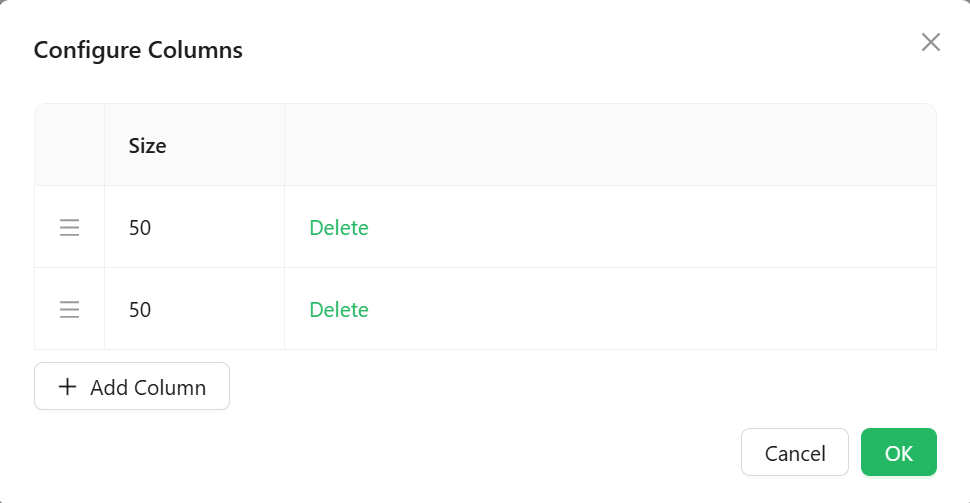
Size is the only per-column setting. There is no minimum/maximum width boundary or per-column styling here - the divider between columns is dragged freely by the end user at runtime, and the Size values only set the initial proportions.
Style
Margin & Padding
A StyleBox control for setting the component's margin and padding. A new SizableColumns starts with a 5px bottom margin.