App Context
App Context is a storage area shared by the whole application, useful for settings, configuration, or a value that needs to be shared across different parts of the application rather than kept on a single form. In scripts you reach it through application.state.
See Data Contexts for how it compares to page and form scope, and Application API for the full reference. This page covers binding a component directly to it.
Binding a Component to App Context
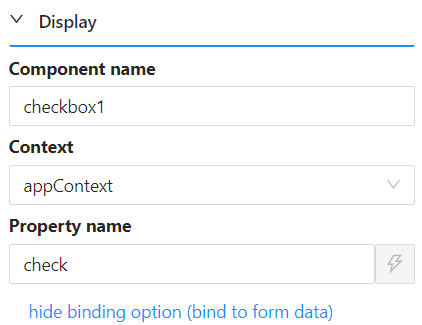
A component is bound to App Context the same way as any other context: give it a Property Name, then set its Context property to appContext.
Reading the Bound Value in a Script
Suppose a Checkbox component's Property Name is check and its Context is set to appContext, as in the screenshot above. Its value is then available anywhere in a script as:
application.state.check
Binding several components to App Context lets one field's value, a checkbox for example, drive conditional logic on others: how many fields are shown, which are required, or whether they can be edited. Because every component bound to appContext shares the same storage across the whole application, that logic keeps working after the user navigates to a different page.
Scripts written against earlier versions used contexts.appContext.check. That still works at runtime, so existing forms keep running, but it is no longer suggested or type-checked in the editor. Use application.state in new scripts.