Proxying Input Variables
Component settings such as Visible and Interaction Mode can be configured with a switch or calculated with a JavaScript expression. When Shesha runs one of those expressions, it does not hand your code the raw objects. It hands you proxies that track which values you actually read, so a setting is only recalculated when something it depends on changes. This page explains what that means for the scripts you write.
Why the Values Are Proxied
Consider a form with firstName, lastName, and description fields, where the Visible setting on description is configured as:
return formData.firstName?.length > 3;
The expression reads firstName and nothing else, so Shesha re-evaluates it only when firstName changes. Editing lastName does not trigger it.
Without this, changing any field would re-run every expression on every component, and re-render the whole form with it. That is unnoticeable on a form with two or three components. On a form with twenty fields, tabs, and subforms it produces a visible lag on every keystroke.
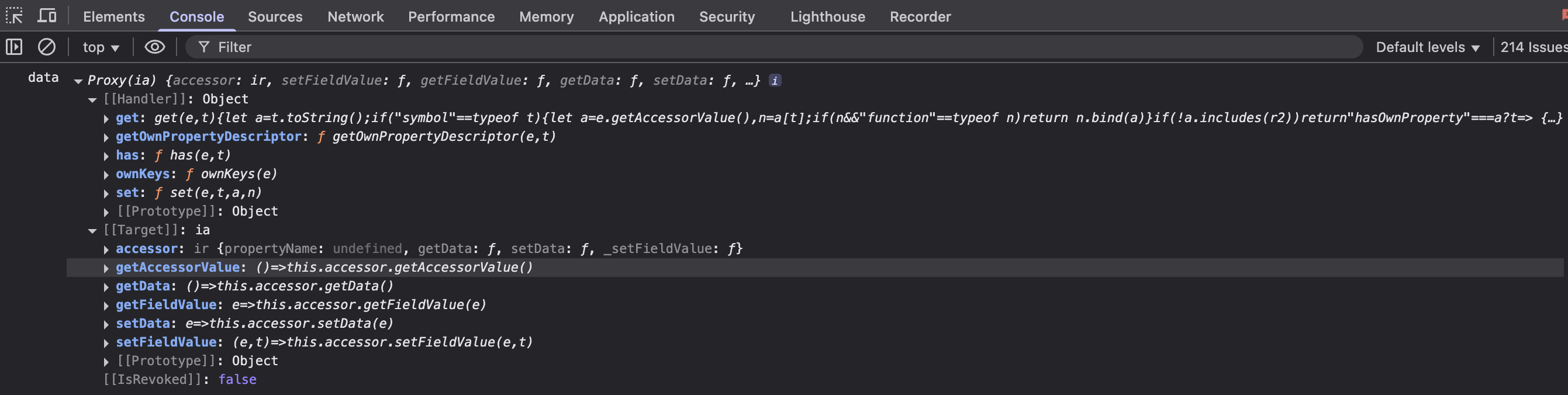
To make the tracking possible, every input variable in an expression is wrapped in a proxy that records which properties are read. Accessing a property returns the real value, so your code behaves exactly as written.
Logging a Proxied Variable
Because the variables are proxies, logging one directly shows the proxy rather than the data.
// Both of these log the proxy object, not the underlying values.
console.log(formData);
console.log(JSON.stringify(formData));
Every scripted setting runs inside an implicit object named context that holds all the values available to the script. The hidden test.getArguments(...) helper unwraps it, returning an array with one small object per exposed value, each already free of its proxy.
const getVisible = () => {
  console.log(test.getArguments(context));
  return true;
};
test.getArguments(arguments) does not return the individual values. It returns a single-element array holding the whole, still-wrapped context object, which is no more readable than logging the proxy directly. Pass the context identifier itself.
See Output the Data Object for more on inspecting script data.
Writing Data Directly
Proxying is also what lets you assign to form data and contexts directly, rather than calling a setter.
Form type to use: Edit Form - use when the user is updating an existing record.
Example - Append to a field's value:
formData.firstName = formData.firstName + ' test';
The same applies to context data:
page.state.selectedRegion = formData.region;
form.setFieldsValue({ ... }) remains the right choice when you are setting several fields at once, or setting values from an event handler rather than an expression. See Form Instance API.