App Context
App Context is a single storage area shared by the whole application, available from every page and form for as long as the app is open. Use it to hold a value that more than one page needs to see or change, such as a preference set on one screen that should still apply after the user navigates to another. Unlike Page Context and Form Context, App Context's data is automatically saved to the browser's local storage, so it survives a page refresh.
Accessing App Context
contexts.appContext is available in any script, alongside the other standard script variables.
It behaves like a plain object: there is no fixed list of properties, so any property you set on it becomes available under that name.
contexts.appContext.selectedRegion = data.region;
Reading it back, from any other page or form in the application:
const region = contexts.appContext.selectedRegion;
App Context's data is backed by the browser's local storage. A value set in App Context is still there after the user refreshes the page or closes and reopens the browser tab, unlike Page Context and Form Context, which are cleared as soon as their page or form closes.
Binding a Component to App Context
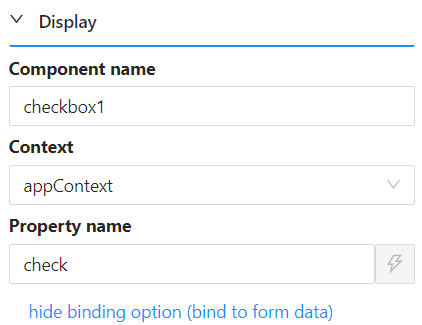
Most Shesha form components use the same Property Name control to decide where their value is stored. Next to it is a show binding option link. Clicking it reveals a Context selector and a Component Name field alongside Property Name.
Choosing the context named appContext there, then a Property Name, makes that component read and write its value directly in contexts.appContext.<propertyName> instead of the form's own data - so its value is shared with every other page and form in the application, not just the one it is on.
Example
Form type to use: Edit Form - or any form type, since App Context is available everywhere standard script variables are.
Example - Remember a filter across pages in a Membership app:
Suppose the Membership app has a Region selector on its dashboard, and a Member List page that should default to whichever region was last selected.
// On the dashboard: save the choice as it changes
contexts.appContext.selectedRegion = data.region;
// On the Member List page: read it back to filter the query
const region = contexts.appContext.selectedRegion;