Implementation
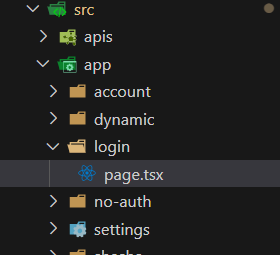
A Shesha starter project already wires its login route up to the configurable Shesha/login form. If your project's login page is not yet set up this way, open src/app/login/page.tsx in your frontend project, remove its entire content, and replace it with the snippet below.
Locate the File
The file lives under your project's src/app folder, alongside the other route folders such as account and dynamic.
Replace the Content
"use client";

import React from "react";
import { ACTIVE_LOGIN, ConfigurableForm } from "@shesha-io/reactjs";

const Login = () => (
  <ConfigurableForm mode="edit" formId={ACTIVE_LOGIN} />
);

export default Login;
ACTIVE_LOGIN is a constant exported by the @shesha-io/reactjs package itself (from its components/mainLayout/constant module). By default it points at LOGIN_CONFIGURATION, the Shesha/login form described in Design.
If you want the login page to use a different form entirely, you don't need to change the form designer or the backend. Import LOGIN_CONFIGURATION instead of ACTIVE_LOGIN, or define your own constant pointing at your custom form's name and module, and pass that as formId instead.
Some starter project templates wrap ACTIVE_LOGIN in a project-level constants file (for example src/app-constants/layout.ts) so it can be overridden without touching page.tsx, and type the page component as PageWithLayout<IProps> (also exported from @shesha-io/reactjs) if the project uses per-page layouts. Neither pattern is required - the snippet above is the minimal working page. Check your own project's scaffolding before assuming either wrapper exists.